What’s new?
You can now select TikTok Interactive Messenger as a reply channel in the Wait → Until the contact replies workflow action. This enhancement allows workflows to pause and resume based on a contact’s reply through TikTok DMs.
How it works
When a workflow reaches a Wait Until the Contact Replies step, you can choose TikTok Interactive Messenger under Reply to. The workflow will continue only after the contact responds through TikTok DM.
How to use it
Add a Wait action to your workflow.
Select Until the contact replies as the wait type.
Choose TikTok Interactive Messenger in the Reply to field.
Why we built it
Businesses using TikTok for customer engagement need reply-based automation across all messaging channels. This update brings TikTok DMs into the same workflow experience, making it easier to build conversational automations and follow-up sequences.
Simple example
A fitness studio sends a TikTok DM inviting prospects to claim a free trial. The workflow waits for a reply through TikTok Interactive Messenger before sending the next message or assigning the lead to a team member.
Additional Notes
Available in the Wait → Until the contact replies workflow action.
Supports replies received through TikTok Interactive Messenger.
Workflows resume automatically once a valid TikTok DM reply is received.
Preview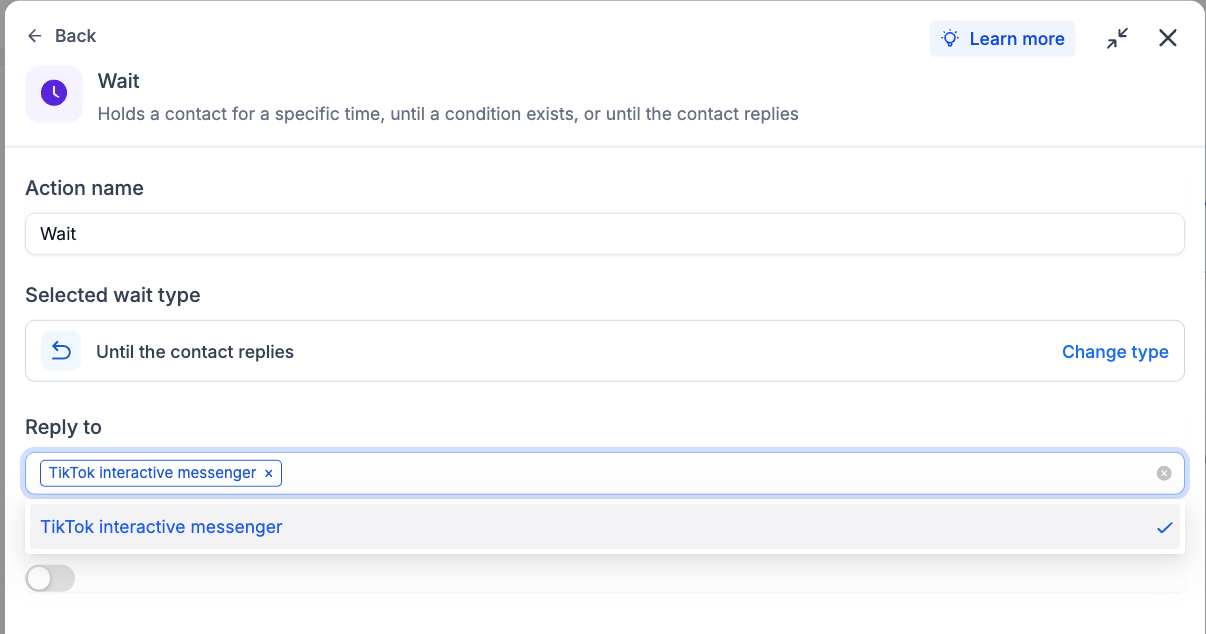
Was this article helpful?
That’s Great!
Thank you for your feedback
Sorry! We couldn't be helpful
Thank you for your feedback
Feedback sent
We appreciate your effort and will try to fix the article